Budgeting System
From hand-filled tables to one shared budget system for 900,000 employees.
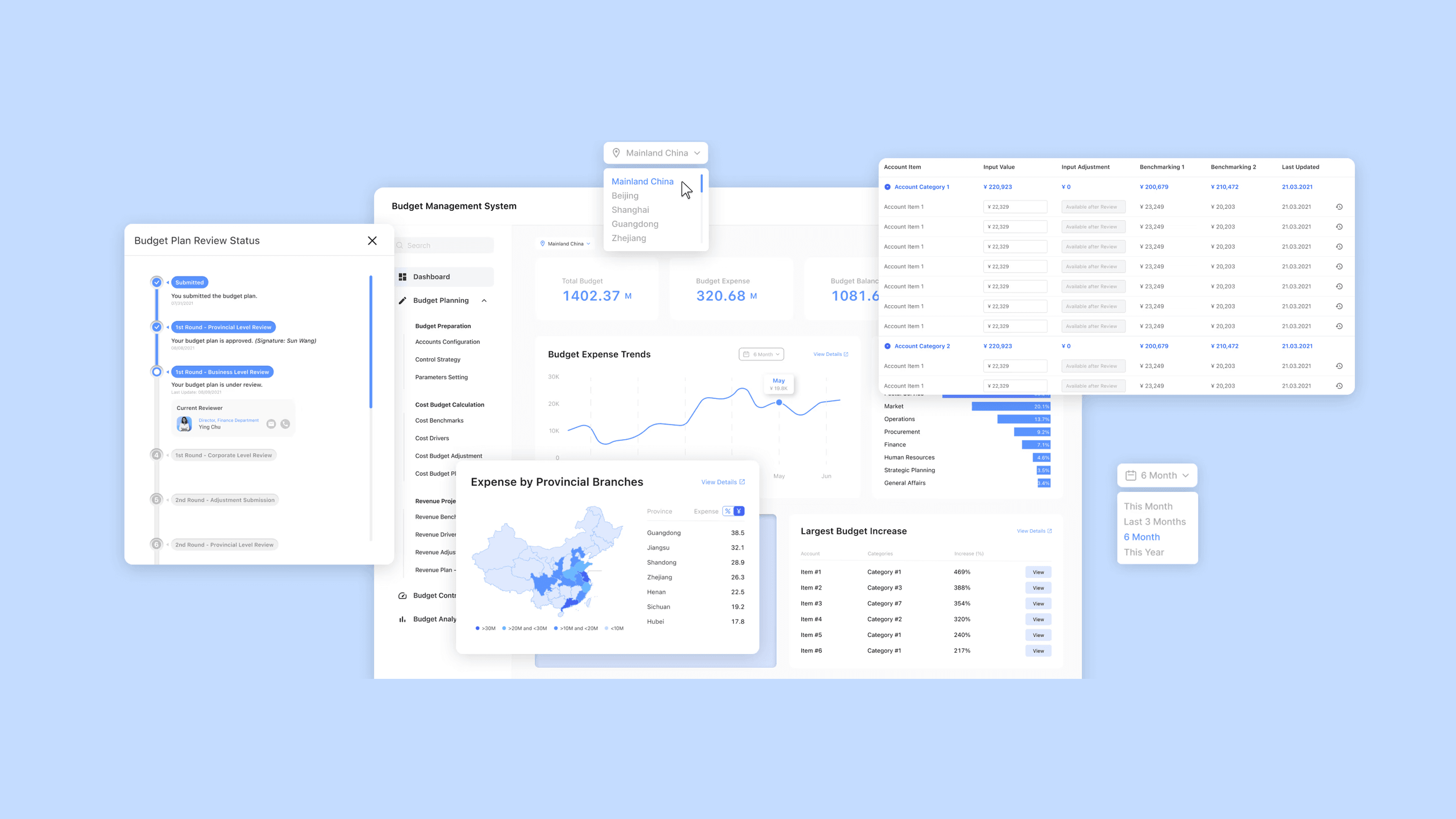
- Role
- UX/UI Designer Design Consultant
- Team
- EY consulting team of 4 (2 junior consultants, 1 senior, 1 manager) China Post's own development, data, and finance teams
- Client
- China Post Group Corporation
- Timeline
- August 2021 – January 2022 (5 months)
- Status
- Implemented across China Post's nationwide network
At a Glance
The Problem
China Post managed its budget across corporate, subsidiary, and provincial levels almost entirely by hand — tables filled in manually and emailed up the chain. Slow, error-prone, and impossible to track in real time.
My Approach
As part of an EY consulting team, designed one budget management system for the whole enterprise — a single platform built, through 56 interviews and a phased rollout, to fit the way every different unit actually works.
Context
Our client's current budget management is inefficient, mainly relying on manual processes.
Our client faced significant challenges in managing its complex budget across multiple organizational levels due to inefficient manual processes. They aimed to digitally transform their financial operations to improve efficiency and accuracy. Specifically, their cost budget planning and reviewing processes had three major issues:
Lack of real-time budget tracking
Users had no access to real-time updates on expenses or budget performance, making it hard to gain timely and actionable insights for informed decision-making.
Slow and error-prone data processing
Users had limited access to historical data, and the extensive account items created a slow, error-prone process that made retrieving information time-consuming.
Insufficient tools for budget review
Current budget review processes lack visibility and adequate tools, leading to miscommunication and delays in budget plan approval and monitoring.
Design Outcome
A SaaS platform that addresses the key challenges of budget tracking, data processing, and review efficiency, transforming the client's financial operations into a scalable system.
Research
We investigated stakeholders' needs and pain points to ensure the design solution effectively addresses core challenges.
Interview with Stakeholders
We conducted 16 interviews with department heads involved in budget planning at the corporate, subsidiary, and provincial levels to capture their expectations and needs for the new system.
Output from Stakeholder Interviews
To plan the rollout and training effectively, I mapped China Post's organizational structure, identifying necessary customizations for different units and departments. This analysis led to a phased implementation approach, starting with Express & Logistics, which is the main subsidiary and had the most complex and extensive account items.
Document Analysis
We gathered and analyzed existing documents used for budget planning, which were previously filled out manually. Each document was reviewed to understand the metadata and data fields required for accurate budgeting.
This analysis helped us identify opportunities for automation, ensuring the new budgeting system would streamline data collection and processing.
Interview with End Users
Within China Post Express & Logistics, we conducted interviews with department heads and budget managers across various departments. I co-facilitated 7 interviews with budget managers.
Insights from end users:
- 01
Current quarterly budget reports created a significant time lag between financial activities and management awareness, hindering the ability to respond promptly to budgetary issues.
- "We need to see what's happening now, not three months ago." — P3
- "Instead of canceling projects in Q4, we could be smarter about spending throughout the year." — P12
- 02
Budget planning was slowed by cluttered tables filled with irrelevant account items, and difficulties accessing historical reference data.
- "It's a nightmare... 6 tables... each with hundreds of items. Half the time, I'm scrolling through stuff that doesn't even apply to us." — P16
- "I spend days digging through old files trying to find the right reference..." — P7
- 03
Budget managers struggled to track approval status and manage document versions, leading to confusion and inefficiency in the review process.
- "Once it's submitted, I have no idea where it is or who's looking at it. Sometimes I wonder if anyone's even seen it." — P5
- "The file names... 0820_v1... 0820_final... but to be honest, I don't know which is the final version." — P8
Ideation
How might we help end users gain actionable insights from financial data, simplify data entry across various departments, and improve efficiency of budget review tracking?
Design Principles
Seamless Adoption
Design intuitive, easy-to-navigate interfaces that require minimal training, ensuring quick and smooth adoption across departments and subsidiaries.
Customization
Allow users to customize views and filters based on their department or subsidiary, making the system adaptable to various roles and needs.
Transparency
Ensure clear visibility at each stage, allowing users to easily track progress and understand who is responsible for each step.
Data Security
Implement robust measures to protect sensitive financial data, ensuring compliance with industry security standards and maintaining user trust.


Process Mapping
Based on insights gathered from interviews and document analysis, I developed a comprehensive process map detailing the current workflow for budget plan submission, review, and approval. This visual representation provides clarity on the overall process and identifies areas for potential improvement.
Information Architecture
I crafted the information architecture for the budget management system with a focus on the Cost Budget Planning feature. The goal was to create a clear, intuitive structure that would allow users to easily navigate and manage key tasks. By organizing the system around user needs and key functions, I ensured that the architecture was scalable and adaptable, supporting various departments and subsidiaries across the organization.
Layout Design
We started our design with the general layout of the budget management system. Since from research we found that users using the main working area most of the time, I proposed a collapsible navigation bar which allows users to have more focus on the budget data sheet.
Implementation
We collaborated with the in-house development team to turn the design into a technically tangible solution.
Align Business Terms with System Language
I discovered a mismatch between the selected organizational level and the displayed data and identified a communication gap: my Product Required Documents (PRD) used business terms, while developers worked with their own terminology.
To resolve this, I initiated detailed sessions with the development team to align our terminology and updated the PRDs to match their system language. This significantly improved communication and streamlined the development process, reducing unnecessary rework.
Iteration
We tested the initial prototype and iterated based on users' feedback.
UA Testing
Over the course of one week, we tested the prototype with over 100 budget managers from 31 provinces. The participants interacted with the system, performing typical budgeting tasks and providing valuable insights into the user experience, functionality, and potential areas for improvement.
Dashboard
Findings:
- 01Participants desire direct navigation from the dashboard to related detailed pages.
- 02Participants want both amount and percentage display for departmental expenses.
- 03Participants seek flexible timeframes for Budget Expense Trends.
- 04Participants desire more efficient provincial expense visualization.
- 05Corporate-level participants require customizable provincial data views.
Data Table
Findings:
- 01Participants preferred to review a single line of data at a time rather than the entire sheet.
- 02Participants wanted a clearer, more direct view of when specific changes were made to individual data lines.
- 03Participants often felt that using a dropdown to select benchmarking options required too much effort and could be streamlined.
Handoff
Delivered the product.
Deliverables
- 56Interviews
- 15Product Requirement Documents
- 20Interfaces
- 4Key Artifacts
Interfaces
Dashboard
Data Table
Impact & Reflection
Measure the effectiveness of the Budget Management System.
System-related Metrics
Time Saved
Compare the time taken for budget preparation before and after system implementation.
Reporting Efficiency
Measure the time taken to generate standard budget reports and compare with current baseline.
Error Reduction
Monitor the number of budget revisions or corrections required pre- and post-implementation.
User Satisfaction
Conduct user surveys after implementation and track the Net Promoter Score (NPS) over time.
Business-related Metrics
Performance Improvement
Monitor key financial ratios such as operational profitability and compare with it before the system implementation.
Financial Decision-Making Efficiency
Measure the time taken from budget request submission to final approval, comparing it with historical data before implementation.
Cost Control Effectiveness
Track the percentage of departments staying within their allocated budgets compared to pre-implementation figures.
Return on Investment (ROI)
Calculate the financial benefits of the new system such as cost savings and efficiency gains against its implementation costs.
Key Takeaways
Complexity of Large-Scale Systems
Through this project, I learned the complexities involved in designing a system for a large corporation like China Post. I discovered the value of phased implementation, which allowed us to manage the project's scale effectively and make iterative improvements. This approach helped in tackling the diverse needs across multiple organizational levels and geographical regions.
User-centered Design
Engaging with stakeholders through interviews and user testing was vital in creating a system that truly met the needs of its users across different roles and departments.
Collaboration with the Engineering Team
I learned the significance of flexibility in design solutions, adapting our ideas to technical constraints without compromising functionality. Creating comprehensive documentation and project artifacts deepened my understanding of the organization's complex needs.